
Requesting your first scans


Getting scans through Sourcery is super easy! Once you determine what you want scanned and where it is, the process of creating a request is simple.
Let’s take a look at what you’ll need to know.
Where the materials are: accessing the right repository and reading room
You’ll want to make sure that the materials you want scanned are accessible. This is especially important for universities and large library systems that have multiple libraries, special collections, and reading rooms! This information will help you instruct your Sourcerer on where and how to retrieve the materials and give you a sense of the timing for appointments and deliveries from offsite storage. Sometimes finding aids include access instructions for specific collections. Additionally, you’ll want to locate and share the general “Visit” or “About Us” page on the repository’s website.
Where the materials are: the archival location
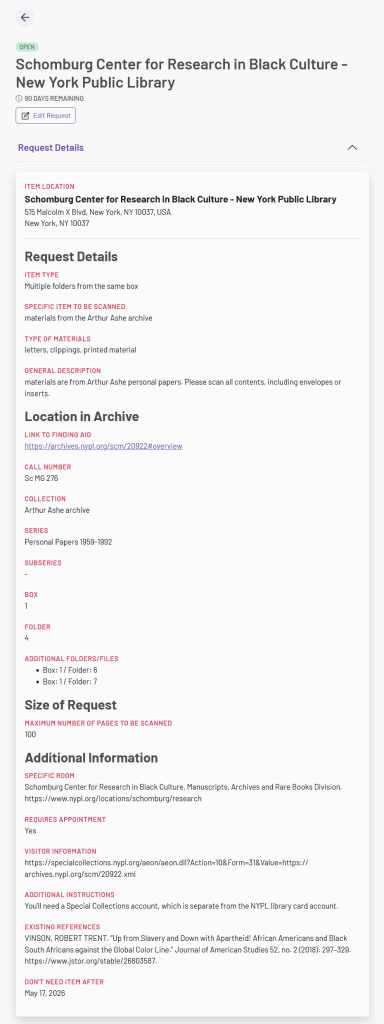
Your Sourcerer will need to fill out a call slip or request form to access the materials in the reading room. So, it’s important you provide all of the information they’ll need. Review the finding aid or catalog closely. Specifically, you’ll want the archival location of the materials, such as a call number, identifier, or collection title. Want a specific folder from a box? You’ll need both the box number and folder number or title. A general description of the materials can be helpful, along with any existing citations that might help your Sourcerer locate the correct materials.
Any insider knowledge: tips for the materials or the repository
Have you already discussed this request with an archivist? Do you know the ins-and-outs of working in that repository? If so, please share it with your Sourcerer to help their visit go as smoothly as possible. For example, if you know that the repository doesn’t require appointments but has long paging wait times you might consider sharing that so your Sourcerer can plan accordingly.
How many scans: you determine the scope of the request
You may not know how many pages are in a folder or volume, but you do know your budget. You will set the maximum number of scans you will pay for, so there won’t be any surprises. You’ll only be charged for the number of scans returned to you, so we suggest you think big. We’ve seen some archival folders with up to 200 pages in them! A higher maximum will help ensure you don’t miss out on the last items in the folder or last pages of the journal.
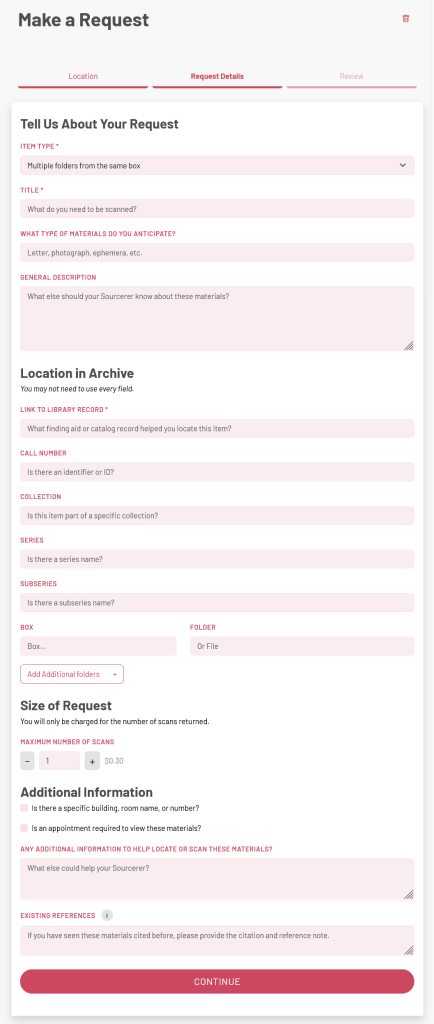
Once you’ve gathered this information, you’re ready to create your request! Input the information you’ve collected into its corresponding field in the material request form. Remember to be as specific as possible about your materials and their location to help your Sourcerer ensure they’re requesting and scanning the correct materials.
Here’s a view of the unfilled request form and a filled-out example request, to give you an idea of what a Sourcery request can look like:
And that’s it! After you submit the request, a local Sourcerer will be able to claim it and begin to schedule their visit to the reading room to get your scans. You can sit back and relax while your Sourcerer scans the materials for you.
Still have some lingering questions? Here are some resources with more specific help:
- Researcher handbook: detailed, step-by-step guide to help you through every step of the process
- Document delivery v. research assistance: What’s the difference and why does it matter?
- Who are Sourcerers?: Peek under the veil and see who these so-called “Sourcerers” actually are…
- Reference quality v. Digitization quality: What to expect when you’re expecting Sourcery scans
- Sourcery’s 2026 roadmap: See what we’re cooking up in our cauldron this year