
Major Sourcery Updates: March 2026

The Sourcery Team is pleased to announce 4 major updates to Sourcery to kickoff 2026!
We’ll chat about each change more in-depth in this blog post, but here are the main beats:
- New pricing: Sourcery requests are now priced through a combination of a standard retrieval fee of $25, and a charge of $0.30 per scan received.
- New request options: You may request scans of various types of materials, including multiple folders, volumes, items with an individual call number, and microform.
- New locations: Researchers from around the world can request scans of materials in over 35 cities and metropolitan regions across the continental United States.
- New notification option for Sourcerers: You may opt-in to email notifications when requests are placed in your preferred locations. Suggestions for new locations are welcome!
Let’s look at each of these changes in more detail.
💸 New Pricing
Going forward, Sourcery requests will charge…
- a retrieval fee to cover the Sourcerer’s time to access the requested materials in the reading room; plus
- a per-scan fee for the materials returned.
Researchers pay the retrieval fee at the time of submission, and the per-scan fee when the scans are returned. Researchers manage the scope of the request by setting a maximum number of scans (up to 400 scans) and will be charged by the number of scans returned.
Researchers won’t have to know the specific number of pages they expect in a folder, book, or box; but they can cap how many scans they will pay for. Sourcerers, meanwhile, can use the maximum number of scans to estimate the size of the request and time required.
📝 New request options
In addition to flat archival materials in folders, you may now request scans of bound volumes such as books, journals, scrapbooks, or ledgers. Items with a unique call number or identifier, such as maps or oversized documents, and microform formats such as microfilm and microfiche are also available to request. All requests will use the standard $25 retrieval fee and charge $0.30 per scan returned.
📍 New locations
Researchers from anywhere around the world can place requests for scans of materials in archives in over 35 cities and metropolitan areas in the United States.
🔔 Notifications for available jobs
You can now select the cities in which you’d like to create scans, and receive email notifications when there are new requests available. If you want to be a Sourcerer in a new location, you can suggest it within the app!
Together, these updates will make it easier for researchers to get the materials they need, and easier for Sourcerers to find the jobs they would like to fill.
Want more details? Everything you need to know is in our Researcher Handbook or Sourcerer Handbook. We also have some Q&A below, and a full FAQ page on our site
Phew! Lots of work happening over here at Sourcery!
🗺️ Have questions about what we’re working on next? Take a look at our 2026 roadmap.
ℹ️ Q & A:
What if my folder/item ends up having more than my chosen maximum scan limit?
- Your Sourcerer will only create the number of scans you have authorized. Your Sourcerer should provide an estimate of the amount of material remaining in your folder after they’ve completed the maximum number of scans. Based on their estimate, you may choose to place another request.
What if my folder/item ends up having less than my chosen maximum scan limit?
- If you overestimate how many pages your document or folder has, that’s OK. You will only be charged for the actual number of scans returned by your Sourcerer. So, if you authorized up to 100 scans but your item ends up only having 20 scans, you will be charged for the 20 scans only. This is why we’ve broken the payment process into two parts: the first to pay the base retrieval fee and the second to cover the number of scans received, after they’ve been taken by your Sourcerer.
What constitutes a “scan” or an “image”?
- One scan or picture taken by the Sourcerer is one image or page. For the sake of simplicity, we refer to these as “scans.” If, for example, your item is a 2-page letter that has writing on the front and back, your Sourcerer will have to take 4 scans (front and back of both pages). Therefore, this letter will count as 4 separate scans and will be priced accordingly.
How does this work for oversized materials?
- Oversized materials like maps might require the Sourcerer to take multiple scans to include different sections to allow the Researcher to piece them together. Each of these images will count as a distinct scan. So, if an oversized poster required the Sourcerer to take four images, it would be priced as four distinct scans.
What if I’m unhappy with a scan returned to me by the Sourcerer?
- Keep in mind Sourcery provides reference quality scans and not digitization or publication quality. If you believe the scans returned to you are not up to Sourcery’s standards, please contact us at support@sourcery.org for assistance.
How do I place a request?
- Fill out the request form, including detailed information on the requested material and their archival location.
- Indicate the maximum number of scans you will pay for.
- Pay the retrieval fee of $25 and authorize the maximum scan fee.
- Your request will then be available for a Sourcerer to claim.
- Sourcerer claims the job and creates the scans.
- Sourcerer submits all scans, notes, and other supporting materials back to you.
- You will be charged $0.30 for each scan returned and you can log in to Sourcery to download the scans.
Why did you adopt this pricing model?
- When we launched in September 2025, requests were priced at a single price per folder or item. At the time we needed to collect payment prior to job completion, so we had to limit requests to predictably standard amounts of time. We found through beta testing that it takes a surprisingly consistent amount of time to scan an entire folder. However, it limited us in some important ways. First, we want to offer scans of a greater variety of archival materials. Not all archival materials are organized by folders, and not all finding aids provide detailed container lists. Researchers need the flexibility to request notebooks and bound materials! Second, we’ve found that Researchers, Sourcerers, and repositories all think of archival scan requests in terms of page count.
How to do I set my location as a Sourcerer?
Here are the steps:
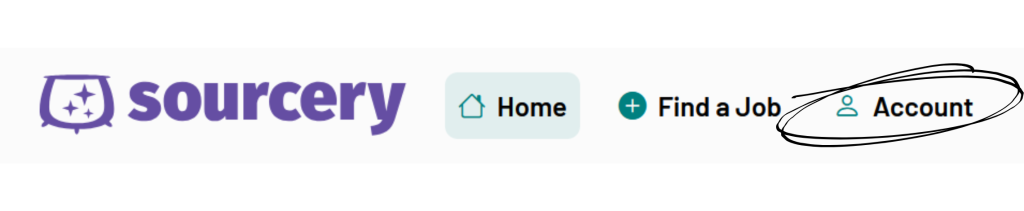
1. After logging into your Sourcery account, open your account settings by clicking “Account” in the header.
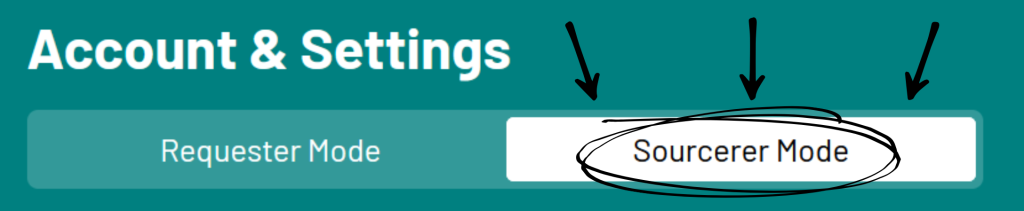
2. Make sure “Sourcerer mode” is selected at the top.
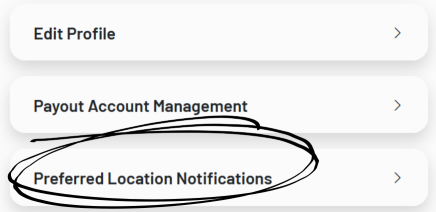
3. Select “Preferred Location Notifications” from the list.
4. Select your region(s) from the list & select “Save Preferences.”
5. Done!
Have questions or feedback about any of these changes? We’d love to hear from you! Contact us at support@sourceryapp.org